Inferse is reader-supported. When you buy through links on our site, we may earn an affiliate commission. As an Amazon Associate I earn from qualifying purchases. Learn more
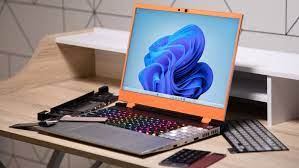
Framework’s latest innovation, the Laptop 16, marks a significant advancement in the field of modular technology. While its predecessor, the Laptop 13, set the stage, the Laptop 16 elevates the concept of a customizable, repairable laptop to new heights.
Key Highlights:
- Unprecedented modularity, including swappable GPUs and expansion bays.
- Intuitive, tool-less modularity and a well-balanced IPS display.
- Offers substantial customization options, including ports and internal components.
- The device is bulkier and heavier than typical laptops.
- Some components, such as the keyboard, have been critiqued for their feel and build quality.
Modular Design Revolution
Framework’s Laptop 16 distinguishes itself with its modular design, pushing the boundaries of laptop customization. The ease of swapping components, from graphics cards to SSDs, is a standout feature. This modularity extends to the external design as well, with users being able to reconfigure the keyboard, touchpad, and additional modules like number pads or LED matrices without the need for tools.
Performance and Customization
The Laptop 16 isn’t just about looks; it packs a solid performance punch. It supports upgradable graphics, making it a potentially future-proof investment. Customization extends to the ports as well, with various USB-C dongles available for different connections, catering to a wide array of user needs.
Do these 3 things before closing this tab:
1Repair Windows errors before they cause bigger problems2Scan for outdated or missing drivers - takes under a minute3Clear out junk files and repair common Windows errorsAesthetic and Practical Challenges
While the Laptop 16 scores high on innovation and customization, it does have its drawbacks. The device is heavier and bulkier compared to standard laptops, and some of its components, particularly the keyboard, have received mixed reviews regarding their tactile feel and durability. This aspect might impact the overall user experience, especially for those accustomed to more traditional laptop designs.
Shopping ad

- Brilliant display: Go deeper into games with a 16” WQXGA 120Hz display with 300 nits brightness.
- Game changing graphics: Step into the future of gaming and creation with NVIDIA GeForce RTX 5050 Laptop GPUs, powered by NVIDIA Blackwell and AI.
- Innovative cooling: A newly designed Cryo-Chamber structure focuses airflow to the core components, where it matters most.
- Comfort focused design: Alienware 16 Aurora’s streamlined design offers advanced thermal support without the need for a rear thermal shelf.
- Dell Services: 1 Year Onsite Service provides support when and where you need it. Dell will come to your home, office, or location of choice, if an issue covered by Limited Hardware Warranty cannot be resolved remotely.
The Future of Framework and Modular Tech
The Framework Laptop 16 is more than just a product; it represents a shift in the laptop industry towards greater modularity and repairability. It’s a bold step in a market dominated by less customizable options, and Framework’s commitment to this vision is evident in the Laptop 16’s design and functionality.
In summary
The Framework Laptop 16 is a unique, ambitious venture into the realm of modular laptops. Its customizable nature and solid performance are commendable, but it comes with the trade-offs of increased bulk and some build-quality concerns. As the technology evolves, it will be interesting to see how Framework refines this concept and how the market responds to this innovative approach.
Quick Recap
Shopping ad

- Brilliant display: Go deeper into games with a 16” 16:10 WQXGA display with 300 nits brightness.
- Game changing graphics: Step into the future of gaming and creation with NVIDIA GeForce RTX 50 Series Laptop GPUs, powered by NVIDIA Blackwell and AI.
- Innovative cooling: A newly designed Cryo-Chamber structure focuses airflow to the core components, where it matters most.
- Comfort focused design: Alienware 16 Aurora’s streamlined design offers advanced thermal support without the need for a rear thermal shelf.
- Dell Services: 1 Year Onsite Service provides support when and where you need it. Dell will come to your home, office, or location of choice, if an issue covered by Limited Hardware Warranty cannot be resolved remotely.
Shopping ad

- Edge-to-edge clarity: Enjoy crisp, expansive visuals on a 16-inch 2K display and a 16:10 aspect ratio—delivering a wide, immersive viewing experience.
- All-day comfort: Dell ComfortView Plus helps reduce harmful blue light emissions while preserving true-to-life color, keeping your eyes comfortable even during prolonged screen time.
- Ready for business: Flip between effortless productivity and captivating entertainment on a large, immersive screen powered by Intel Core processors and graphics.
- Built for virtual connection: Bring your connections to life with an up-to FHD camera, designed with wide dynamic range and temporal noise reduction to deliver crisp, sharp images, no matter the lighting conditions.
- Adaptive thermals: Built-in technology allows your PC to sense when it's on a stable surface and adjusts its power and thermals to run more efficiently.
Product prices and availability are accurate as of the date/time indicated and are subject to change. Any price and availability information displayed on Amazon at the time of purchase will apply.