Inferse is reader-supported. When you buy through links on our site, we may earn an affiliate commission. As an Amazon Associate I earn from qualifying purchases. Learn more
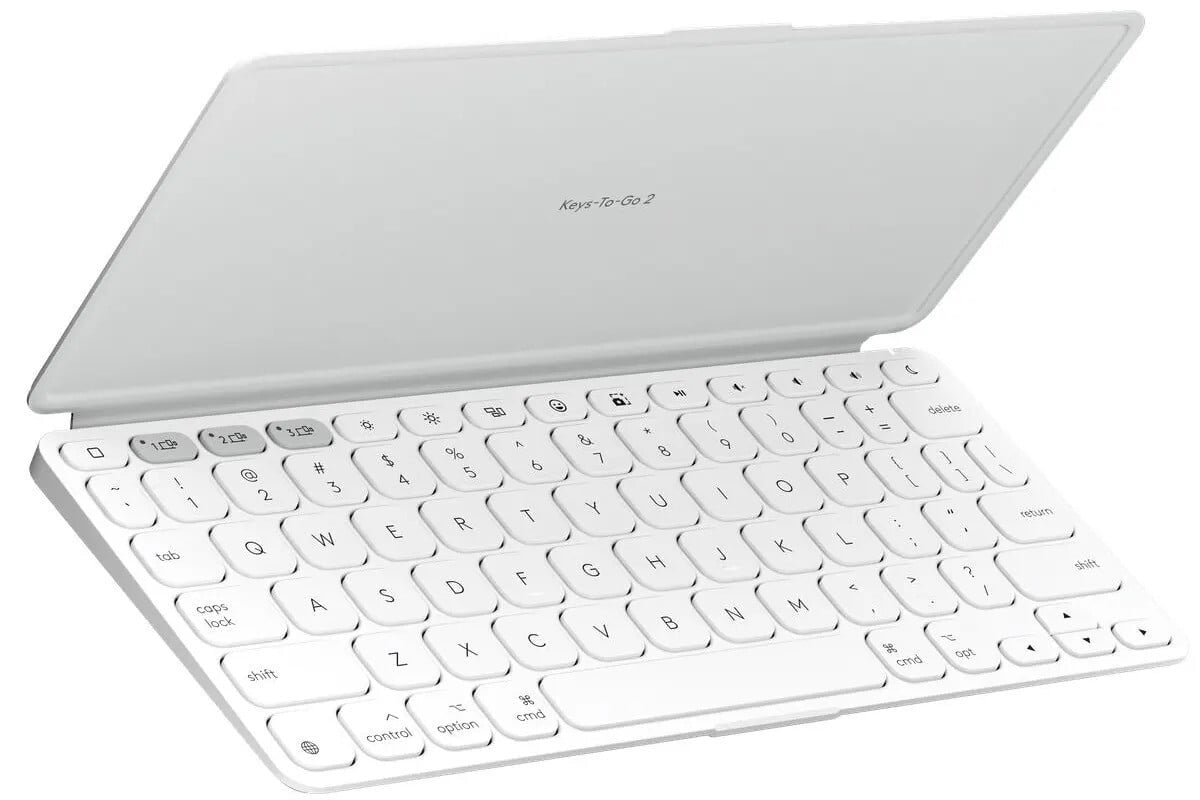
The Logitech Keys-to-Go 2 keyboard emerges as a significant upgrade for those in need of a portable, lightweight typing solution. While retaining its trademark slimness and lightness, this keyboard model introduces improved functionalities that cater to a broad range of devices, from smartphones to tablets, and even computers across various operating systems.
Design and Build
Logitech’s Keys-to-Go 2 maintains a slender profile, which makes it ideal for travel or remote working scenarios. The keyboard is encased in a durable, easy-to-clean FabricSkin, ensuring protection against spills and dirt, a feature particularly useful for mobile use. Its compact size does not compromise on the essential experience, offering a full row of iOS shortcut keys which enhance productivity and ease of use.
Performance and Compatibility
Despite its portable nature, the Keys-to-Go 2 faces challenges in typing quality. Users may find the key travel shallow, which can lead to an increase in typos for those accustomed to more traditional keyboards. This model operates via Bluetooth and is compatible with a wide array of devices including the latest iPhone and iPad models, as well as Mac computers. It supports essential connectivity across iOS, iPadOS, and macOS, making it a versatile choice for Apple users.
Recommended Free Tools
Comparative Analysis
When compared to its counterparts like the Logitech K380 or the Apple Magic Keyboard, the Keys-to-Go 2 prioritizes portability over typing experience. The latter keyboards offer better tactile feedback and ergonomic features suited for prolonged use, which the Keys-to-Go 2 trades off for mobility and compactness.
Shopping ad

- For any screen, any OS: Use Keys-To-Go 2 wireless keyboard on tablets and devices that use Windows, Android, ChromeOS, and Googlebook OS
- Ultra Portable Keyboard: The super slim, lightweight design of this portable Bluetooth keyboard makes it easy to pack and go—it’s the perfect companion to your tablet or other mobile device
- Keeps You Covered: Built-in cover protects the compact keyboard from damage so you can stay productive all day long
- Types Beautifully: This small wireless keyboard features perfectly spaced scissor keys for a roomy, comfortable typing experience
- Pair up to Three Devices: Type across three different devices with one small keyboard and switch between them with the tap of a key
Warranty and Support
Logitech provides a one-year limited hardware warranty for the Keys-to-Go 2, ensuring support directly from the manufacturer. This reassurance is crucial for users investing in a device intended for frequent travel and varied usage scenarios.
The Logitech Keys-to-Go 2 keyboard is tailored for users seeking a balance between functionality and portability. While it may not satisfy those desiring a premium typing experience, its broad device compatibility, and robust build make it a reliable companion for on-the-go typing
Quick Recap
Shopping ad

- Perfect Stroke Typing with Smart Keys (1): Type on keys shaped for your fingertips, with voice to text Dictation (4), Mic Mute/Unmute, and Emoji keys
- Mini Size, Mighty Powerful: A layout designed for effortless precision, with a minimalist form for an ergonomic keyboard that's portable and can travel wherever you get work done
- Smart Illumination: The wireless keyboard's backlit keys light up the moment your hands approach, and automatically adjust to suit changing lighting conditions
- Multi-Device, Multi OS: Pair MX Keys Mini compact keyboard with up to 3 devices on nearly any operating system via Bluetooth Low Energy and switch between them seamlessly
- Multiple Computers, One Flow: Team the slim MX Keys Mini with MX Master 3 or MX Anywhere 3 and type across multiple computers or laptops in one fluid workflow(1)
Shopping ad
- Ultra Portable Keyboard: The super slim, lightweight design of this portable Bluetooth keyboard makes it easy to pack and go—it’s the perfect companion to your tablet or other mobile device
- Keeps You Covered: Built-in cover protects the compact keyboard from damage so you can stay productive all day long
- Types Beautifully: This small wireless keyboard features perfectly spaced scissor keys for a roomy, comfortable typing experience
- For Any Screen, Any OS: Use the Keys-to-Go 2 wireless Bluetooth keyboard with tablets and devices that use Windows, Android, macOS, and ChromeOS
- Pair up to Three Devices: Type across three different devices with one small keyboard and switch between them with the tap of a key
Shopping ad

- For any Apple OS: Use Keys-to-Go 2 portable wireless keyboard on your Apple devices; compatible with iOS, iPadOS, MacOS
- Ultra-portable: The super slim, light design of this wireless Bluetooth keyboard makes it easy to pack and go—it’s the perfect companion to your tablet or other mobile device
- Keeps You Covered: Built-in cover protects the compact keyboard from damage so you can stay productive all day long
- Types Beautifully: This small wireless keyboard features perfectly spaced scissor keys for a roomy, comfortable typing experience
- Pair up to Three Devices: Type across three different devices with one small keyboard and switch between them with the tap of a key
Product prices and availability are accurate as of the date/time indicated and are subject to change. Any price and availability information displayed on Amazon at the time of purchase will apply.